Showing posts with label electronics. Show all posts

Friday, 8 November 2013

R/C Low Pass filter (passive) cheat sheet


Cutt Off freq= 1 / ( 2 π R C )


C =  33 nF; R = 220 R (Ohms); Cut-off freq.= 21.92 KHz
C = 150 nF; R = 100 R (Ohms); Cut-off freq.= 10.61 KHz
C = 150 nF; R =    1 K (Ohms);  Cutoff freq  = 1.06 KHz
C =  2.2 uF; R = 100 R (Ohms); Cut-off freq.= 723.43 Hz
C =   10 uF; R = 100 R (Ohms); Cut-off freq.= 159.15 Hz
C =   22 uF; R =   68 R (Ohms); Cut-off freq.=  106.39 Hz

* I tried to use some of the most common values for the Resistors and Capacitors; keep in mind this drops at +- 20 dB per octave   ( 2 f ).

C =  220 nF; R =    1 K (Ohms); Cut-off freq.=723.43


Graphs and simulations done with Falstad online sim


Thursday, 24 October 2013

Wednesday, 23 October 2013

Some exercises with the "Caesar cipher" Pt 2.

Plaintext    |a |b |c  |d |e |f  |g |h |i   |j | k | l  | m| n| o | p | q  | r  | s | t  | u | v | w | x | y | z |
P-Number  |0 |1 |2 | 3 |4 |5 |6 |7 |8 |9 |10|11|12|13|14|15 |16 |17|18|19|20|21|22 |23|24|25|
Ciphertext |d |e | f | g |h |i  |j  |k |l |m | n | o | p | q | r  | s| t  | u | v | w | x | y | z  | a | b  | c |

In the Caesar cipher, the modulus operator was used to achieve a fast way of computing the result.
The use of an array from 0 to 25 is inherent to the discrete implementation methods widely used. Look-up tables also get this particularity many a times !
If it is not obvious why, wait until one of the next posts on the subject. Other examples will surely make obvious why .
Let's remember  what was said in a previous post :

// Caesar cipher ==> C = (P+s) Mod (Number_of_Characters)
// Number_of_Characters also known as Keyspace = 26 (0 to 25)
// P = numerical equivalent of character plaintext
// C = Numerical equivalent of cipher text character
// s = number of shifts,adds (n_shift)
// Ke = s = 3 ==> (P+s) mod (Number_of_Characters)
// Kd = -s = -3 ==> (C -s)mod (Number_of_Characters) (reverse operation)

From this, we can then adapt this idea into the way the ascii numerical code uses to represent printable characters.

// Keyspace = 96 ( Nchars; )
// P = retrieved
// s =  n_shift
// [ from "ascii'" character number 32-decimal; 040-OCT; 20-HEX; 00100000-BIN ==> "SPACE" 
// to "ascii'" character number 126 decimal; 176-OCT; 7E-HEX; 01111110-BIN; ==> "~" Equivalence sign - tilde

The way i found was to first subtract  an ascii_offset (retrieved -=32;) compute the algorithm ( uint16_t c =(retrieved + n_shift)% Nchars; ) and then re-add the ascii_offset (retrieved +=32;).

C = (P+s) Mod ( Keyspace )

I should probably note the fact that it should not be confused with the remainder.
Let us see why...

If in C = A modulus B ,  A=13 and B=5 , then C=3 ;
If    C = A remainder B, then it is also C=3.

BUT (and there are always but's) what if we give A=13 and B= -5 ?!
Then, we would get A Modulus B ==> C= -2; In turn, A Remainder B ==> C=3 !!

Oh, yeah !! The art of the Modulus operator in itself  ( specially with only the use of a hand calculator), and its relationship with cryptography, is an art in itself , and can easy allow for a series of posts elaborating on it !
As an example, check the table below (created with Gnumeric) .


Code here
https://docs.google.com/document/d/1CbK-v1OaQIhbr0ao5EY8CrGZ71M9-t4cav4bK4JBwo0/edit?usp=sharing

Sunday, 21 July 2013

Behringer BCF2000 : some insight !


Seeing it has invaded so many home studio set ups built around DAW sequencers, etc, i had to share this article around this infamous midi controller.


http://ricardo-dias.com/2013/07/19/repairing-a-behringer-bcf2000/

Friday, 12 April 2013

Dub siren Midi Controller ( Interruptor VST) Schematic with ATMega 2560

Built and designed to interact with the VST dub siren FX from The Interruptor @ his forum .

The trigger is a button connected to D22 on arduino The rest are 12 pots, that will control the Pitch, Level and Freq of both LFO's, Vol, Time, Feedback,Hp,Lp and noise !

The LCD is connected as usual...


Schematic in PDF, NOT IN BREADBOARD FORMAT

Monday, 1 April 2013

sinewave generator with the DAC of the ARM SAM3X


On my adventures in Digital signal processing and sound synthesis, i started to do some experiments...
First was to do a sinewave generator with the DAC of the Arduino DUE and the timer interrupt at 4096 samples per second. I know its not much for the ARM core of the SAM3X chip that clocks at 84Mhz, but was a exercise more than anything. This is quite scalable, anyway !
Direct digital synthesis is a common technique for generating waveforms digitally. The principles of the technique are simple and widely applicable. You can build a DDS oscillator in hardware or in software.
A DDS oscillator is sometimes also known as a Numerically-Controlled Oscillator (NCO).
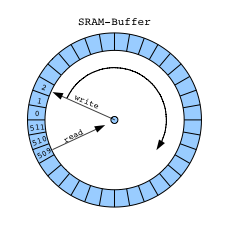
Usually we use a Circular buffer or FIFO.


The NCO function contains a sine look-up tables (LUTs) that perform the following functions:

sin(n) = sin(2πn/N)
where:
n = Address input to the LUT
N = Number of samples in the LUT
sin(n) = Amplitude of sine wave at (2πn/N)


Incrementing n from 0 to N causes the LUT to output one complete cycle of amplitude values for the sine  function. The value 2πn/N represents a fractional phase angle between 0 and 2π. The time (t) required to increment n from 0 to N is the period of the sine  waveforms produced by the NCO function.

The LUT address is incremented once each system clock cycle by an amount equal to the phase input. The phase angle data is accumulated and stored in the phase accumulator register. The output of the phase accumulator register is used to address the LUTs.
The frequency (f) of the system clock (fCLK) is fixed. Therefore, the frequency of the sine waves is:

f = 1/t = fCLK × phase/2π.

 
As a taster of the code to come (Used the proverbial timer interrupt example code, and the old techniques on Direct digital synthesis available at places like interface.khm.de) .Ill leave you some pictures
Mine is the picture below (1st), below is the output of a grain synth , code available at rcarduino.blogspot.co.uk.
*The sinewave generator code i shall share is not the one at this link above, but an " original " one !.
Also had to mention the wicked BASIC program i been using to help me in my math algorithms  called "Decimal BASIC", available at  http://hp.vector.co.jp/authors/VA008683/english/.
The sine wave graphic at the top is from it !!


Tuesday, 19 March 2013

AVR /Arduino ChipTune Synth

Just a video ( sorry for the crap sound, as it was from a phone) showing the Kryo AVR chiptune in action.
And the original below (much better sound) !


Reference : http://www.linusakesson.net/hardware/chiptune.php

Sunday, 11 November 2012

Update in pictures...


Delay ! PT2399, slightly mod'ed for reggae and dub production... Free running feedback "Emergency" toggle switch, modulation and control... LUSH !!

 LCD Back Pack and a 4046, part of a digital dubsiren based around the ATMega 328 ( Arduino Code available !)

 Initial tests to some synth stuff through midi, and of course...MIDI !!
Will be using the Pinguino board with a PIC32 at 80Mhz ...BOOM !
You even get space to add delay and all....

Proverbial Cheat sheet !!


Saturday, 21 July 2012

DubWorks Studio delay for dub and reggae productions

Studio delay ( DubWorks model, based around the Princeton Technologies  PT2399, redesigned for dub and reggae productions ) getting ready to leave premises..
This model was redesigned so it could give me all the sounds a good reggae and dub production needs( meaning old school grit and sounds)
This one is going to Brad The Manor, in London .


Friday, 20 July 2012

Simple siren generator for Arduino.

This is a simple siren generator, as mentioned.
We will only improve on this...
Graphics and schematic by Fritzing (http://fritzing.org/ )


/*
 * Siren Generator with adjustable rate
 * Version 0.1
 * Author: Ras B / Keith Gray 
 * Created: 3/5/12
 */
#include <LiquidCrystal.h>

// initialize the library with the numbers of the interface pins
LiquidCrystal lcd(12, 11, 5, 4, 3, 2);

const int SPKR_PIN = 10; //assigning pin 10 to the speaker
const int MAX_FREQ = 10000; //max frequency of the siren wail
const int MIN_FREQ = 3700; //min frequency of the siren wail

int potRead = 0; //potentiometer read in pin Analog 0
int potValue ; //value for potentiometer read 
int FREQ_SKIP ; //frequency skip variable
int DELAY = potValue; // variable for delay linking it to the potValue variable

void setup()
{
  pinMode(SPKR_PIN, OUTPUT);
  pinMode (potRead, INPUT);

  updateDisplay();
  updatefreqSkip();
}
void updateDisplay() //creating a function we can call that updates the LCD
{
  lcd.clear();
  // adding some name to the values we want to display:
  lcd.print("Rate=");
  // calling the values we want to display:
  lcd.print(potValue);
  lcd.print(" Freq=");
  // Print the value of the frequency skip
  lcd.print(FREQ_SKIP);
}

void updatefreqSkip() //creating a function we can call that updates the FREQ_SKIP
{
  if (potValue >= 8)
  { 
    FREQ_SKIP = 10 ;
  }
  else
  {
    FREQ_SKIP = 30 ;
  }
}


void loop()
{
  updatefreqSkip();

  potValue = analogRead(potRead);
  potValue = map(analogRead(potRead), 0, 1023, 0, 10);

  updateDisplay();

  unsigned long siren_start_time = millis();
  int freq;
  updatefreqSkip();
  updateDisplay();
  do
  {
    for (freq=MIN_FREQ; freq<=MAX_FREQ; freq+=FREQ_SKIP)
    {
      analogRead(potRead);
      DELAY = potValue;
      tone(SPKR_PIN, freq);
      delay(DELAY);
    }
    updateDisplay();
    updatefreqSkip();

    for (freq=MAX_FREQ; freq>=MIN_FREQ; freq-=FREQ_SKIP)
    {
      analogRead(potRead);
      DELAY = potValue;
      tone(SPKR_PIN, freq);
      delay(DELAY);
    }
    updateDisplay();
    updatefreqSkip();
  }
  while (millis() - siren_start_time < 5000L);
}


Sunday, 1 July 2012

Saturday, 30 June 2012

AVR- Intro to I/O ports in C Language instead of Arduino/Processing Language


As sometimes we do need to use a faster code, i have been looking into using AVR coding in C , as opposed to the normal Arduino/Processing language that makes away with it all, allowing us to use a simplified dumbed down version of it.


For this basic introductory tutorial, I'll be assuming that you have a basic grasp/knowledge of Digital Logic systems, binary numbers, logic gates and Boolean algebra.  at least the basics of C Programming ( which can be replaced at least with some experience/knowledge of the  Arduino/Processing language, for purposes of this exercise, or any High Level programming language) and of course, some basic knowledge of Electronic circuits and the Ohm's Law.


So, as first thing, ( and i will come back to this in more detail at another time) i have to let you know the structure of a program, as it is different from the Arduino way.
Arduino, as you probably read by now, made it much easier for beginners and newcomers to code, by only needing us to use a void setup()  and a void loop().


But in AVR we will be using C, (  avr-gcc C compiler  , version 4.3.0  or later at least ) so we will have to do it differently , by the rules. I will just leave here a template of a basic program with a loop, so it doesnt end on us.
Personally i use CodeBlocks ( that even has a modified version for Arduino with a basic simulatoor and all: HOW COOL IS THAT  ?! lol )


#include <avr/io.h>  // In this line, called a header file is included avr/io.h , 
// an AVR device-specific I/O definitions library that register 
// names defined, used in the later stages. Check 
// http://www.nongnu.org/avr-libc/user-manual/modules.html 
// for more info and reference */

int main(void)  // This is the main part of the program, where it actually starts. */
{
  while(1)
    // Note that we use a '1' as the argument to the while loop, because anything other than '0' is 
    //a logical true. Therefore the while loop condition will never be anything other than 
logically true, and the program 
    //will continue to execute indefinitely  */
  {
    // Code would be in here if needed to execute over and over and over ... endlessly */
  }               
}


As starting poing, i'd recommend the ATMega328 Datasheet everytime you dont understand a term here used (hardware related), or have doubts regarding the hardware side of the architecture of the micrcontroller itself.


Also, we will use the pin mapping of the ATMega 328 as a guidelline for this exercise !


So, first a quick explanation of the concept of the PORTs in the ATMega. To note the fact that there are 3 types of functions we can perform with the uC's : Controlling, sensing and communicating.
For test purposes we will start with controlling a led, as it is the HELLO WORLD of electronics and also in Uc's world.


Each AVR implements 3 different set of GPIO registers (GPIO - General Purpose Input / Output). The registers used are:


  • DDRx- Data direction register for port x


x corresponds to A , B , C , D , etc. (Depending on the number of ports used by the AVR chip that we are using at the time). Bit (1) in the register  for output. bit (0) (cleared)  for input.


  • PINx - Address for input port x .


State of the port. Independent of the setting of Data Direction bit DDRx, the port pins can be read through the PINx Register bit.
In order to use the data read from port pin, first you have to change port’s data direction to input. This is done by setting bits in DDRx to zero. If port is made output, then reading PINx register will give you data that has been output on port pins.
Bit 1 if pin is "HIGH"; if bit 0 , port pin is "LOW".


  • PORTx - Data register for port x


This register is used for two purposes:  To output data ( when port is configured as output) and to activate/deactivate pull up resistors ( when port is configures as input).
For pins that were connected by DDRx on input, the internal pull-up resistors can be enabled or disabled via PORTx  (1 = enabled).

So for purpose of this exercise we will use the PORTD ( PD0 to PB7) which are the Digital pins 0, 1, 2, 3, 4, 5, 6 and 7 on the Arduino Uno/ATMega328.


OK, first maybe we should define the state of the direction of the data; We already know it can be INPUT or OUTPUT.So, when defined as an INPUT, he will be waiting  to sense a voltage ( or "listen" to it).
When the pins are in OUTPUT mode, use a logic of either 5 V or 0V; HIGH and LOW; 1 or 0 when in an OUTPUT mode !

And how can we control through the uC?!?

So, it is easy: All we have to do is simply tell Pin5 on PORTD to output 5 volts( Digital Pin 5 on Arduino UNO ; Maybe you can try this on PORTC IF YOU USING A MEGA... Digital pin 37 to 30). Note that this must be accomplished for each pin we wish to use in our circuit.

So, first, we will have to define the PINs we want to use as outputs in the following register:

DDRD = 0b00000001;

*There are several ways to set pin5 of in the PORT B to output.This is just one way, in bynary in this case. Mind the fact that This notation is only available in GNU C and not defined in ISO-C.  But we will talk about that at a later stage.

So, let me explain in detail what we doing here.  "DDRD" refers to the Data Direction Register for port D; "0b" is to tell the compiler that what follows is the binary expression of a number ( as we are using bynary in this instance; Mind that you can also do it in Hexadecimal, to which we will come to , on another time); and the "1" on the end denotes the pin 0 position (the first pin in port D).
Mind the fact that there are 8 pins for port B; pins 0 through 7. And maybe the brightest sparks noticed already that we are using also 8 digits in our code statement. So each digit represents a pin on the port, and we can use the individual digits to specifically refer to any one of the pins in port D.
So the '1' at the end of our code statement refers to the first pin in port B, which in this case is pin 0. (To note the fact that C and C++ are ZERO-BASED languages, so the first index of a data structure refers to, is the zero'th element; the second index refers to the first element, etc.). So, based on the explanation of the registers given above we can see that to apply a HIGH logic to a pin, we should use PORTD in this case, which is  the Data register for port D.
So the result is as follows:

PORTD = 0b00000001;


#include <avr/io.h>  

int main(void)         // For now we are just going to turn a led on */
{
  DDRB = 0b00000001;   // Data Direction Register setting pin0 to output and the remaining pins as input
  PORTB = 0b00000001;  // Set pin0 to 5 volts

  while(1)
  {
    // * "empty" loop, we including so the code keeps being executed. Maybe you would 
    // like to try it without the while loop 
    // Code would be in here if needed to execute over and over and over ... endlessly */
  }

  // * Never reached * / 
  return  0 ;                  
}


-0-0-0-0-0-0-0-0-0-0-0-0-0-0-0-0-0-0-0-0-0-0-0-0-0-0-0-0-0-0-0-0-0-0-0-0-0-0-0-0
=-=-=-=-=-=-=-=-=-=-=-=-=-=-=-=-=-=-=-=-=-=-=-=-=-=-=-=-=-=-=-=-=-=-=-=-=-=-=-=-=


=>Regarding Hexadecimal, Binary and decimal<=


Just a quick cheat-sheet for those who might need it ( some is from the port 
manipulation post i done a while ago):


Binary| Hex
0000  |  0
0001  |  1
0010  |  2
0011  |  3
0100  |  4
0101  |  5
0110  |  6
0111  |  7
1000  |  8
1001  |  9
1010  |  A
1011  |  B
1100  |  C
1101  |  D
1110  |  E
1111  |  F

(precede with 0x)


                                                                                                                              ERRATA: The right-hand picture has an error in 1 decimal, as it is easy seen ( I DIDNT,lol ! Thanks, dropes !)


So in those terms, this code

void setup()
{
  DDRD = B11111111; // set PORTD (digital 7~0) to output
}

could be written as:
void setup()
{
  DDRD = 0xFF; // set PORTD (digital 7~0) to output
}


Same way that


void loop()
{
  PORTD = B00000000; //Digital 0~7  to LOW
}
Could be done as
void loop()
{
  PORTD = 0x00; //Digital 0~7  to LOW
}


To be continued...


Useful Reference links:

http://sensorsweep.tripod.com/binary.html - Has a nice animation as well, counting in bynary so you can get a better understanding

http://www.inetdaemon.com/tutorials/basic_concepts/number_systems/binary/index.shtml

http://www.mathsisfun.com/binary-decimal-hexadecimal-converter.html - nice handy converter between hexa, Bynary and decimal

Tuesday, 26 June 2012

DIY DUBSIREN Kits (test PCB Boards)

My test PCB Boards( without ground plane, as they only test boards) just arrived...
So, after my tests, we will finally have available soon the DIY DUBSIREN Kits available !! 2 Diff models !! Nuff works happening !! 


Thursday, 21 June 2012

Infra red Decoder

As i have been playing with robots, i decided either to use Infra red for a remote control, or Radio Control.
So for now ill be testing some Infra red.
As we all have older remotes at home lost in our drawers, i decided t use the Arduino Mega to decode one of them and use it maybe.

So lets start with what a Infra red emitter/receiver does in a remote control
http://en.wikipedia.org/wiki/Remote_control
Also check
http://www.sbprojects.com/knowledge/ir/index.php

So, i ordered a TSOP2438 IR receivr that works with a modulated carrier at 38Khz.
And i got it connected like this, after reading the datasheet:
-Yellow to Digital Pin 19 ( remember i am using the Mega 2560...)
-Black to ground
-Red to 5V


So, lets see the code

/* Raw IR decoder sketch!
 
 This sketch/program uses the Arduno and a TSOP2438 to 
 decode IR received. This can be used to make a IR receiver
 (by looking for a particular code)
 or transmitter (by pulsing an IR LED at ~38KHz for the
 durations detected 
 
 Code is public domain
 */ 
// We need to use the 'raw' pin reading methods
// because timing is very important here and the digitalRead()
// procedure is slower!
//uint8_t IRpin = 2;
// Digital pin #2 is the Pin D19 on the Mega2560(PD2) 
// see http://arduino.cc/en/Hacking/PinMapping168 for the 
// UNO pin mapping with ATMega168/328

#define IRpin_PIN      PIND
#define IRpin          2
 
// the maximum pulse we'll listen for - 65 milliseconds is a long time
#define MAXPULSE 65000
 
// what our timing resolution should be, larger is better
// as its more 'precise' - but too large and you wont get
// accurate timing
#define RESOLUTION 20 
 
// we will store up to 100 pulse pairs (THIS IS A LOT)
uint16_t pulses[100][2];  // pair is high and low pulse 
uint8_t currentpulse = 0; // index for pulses we're storing
 
void setup(void) {
  Serial.begin(9600);
  Serial.println("Ready to decode IR!");
}
 
void loop(void) {
  uint16_t highpulse, lowpulse;  // temporary storage timing
  highpulse = lowpulse = 0; // start out with no pulse length
 
 
//  while (digitalRead(IRpin)) { // this is too slow!
    while (IRpin_PIN & _BV(IRpin)) {
     // pin is still HIGH
 
     // count off another few microseconds
     highpulse++;
     delayMicroseconds(RESOLUTION);
 
     // If the pulse is too long, we 'timed out' - either nothing
     // was received or the code is finished, so print what
     // we've grabbed so far, and then reset
     if ((highpulse >= MAXPULSE) && (currentpulse != 0)) {
       printpulses();
       currentpulse=0;
       return;
     }
  }
  // we didn't time out so lets stash the reading
  pulses[currentpulse][0] = highpulse;
 
  // same as above
  while (! (IRpin_PIN & _BV(IRpin))) {
     // pin is still LOW
     lowpulse++;
     delayMicroseconds(RESOLUTION);
     if ((lowpulse >= MAXPULSE)  && (currentpulse != 0)) {
       printpulses();
       currentpulse=0;
       return;
     }
  }
  pulses[currentpulse][1] = lowpulse;
 
  // we read one high-low pulse successfully, continue!
  currentpulse++;
}
 
void printpulses(void) {
  Serial.println("\n\r\n\rReceived: \n\rOFF \tON");
  for (uint8_t i = 0; i < currentpulse; i++) {
    Serial.print(pulses[i][0] * RESOLUTION, DEC);
    Serial.print(" usec, ");
    Serial.print(pulses[i][1] * RESOLUTION, DEC);
    Serial.println(" usec");
  }
}


So , i then pointed the remote to the receiver and pressed the UP in the cursor,
and this is what i got...


If we ignore the first OFF pulse (its just the time from when 
the Arduino turned on to the first IR signal received) and 
the last ON pulse (it the beginning of the next code), 
you'll find the power code is:


920  usec, 820 usec, 
900  usec, 820 usec, 
1760 usec, 820 usec,
900  usec, 820 usec, 
900  usec, 820 usec, 
900  usec, 1680 usec, 
1780 usec, 1680 usec, 
1760 usec, 1680 usec, 
1760 usec, 820 usec, 
920  usec, 22624 usec, 
920  usec, 800 usec, 
1780 usec, 820 usec, 
900  usec, 820 usec, 
900  usec, 1680 usec, 
1780 usec, 1660 usec, 
1780 usec, 1680 usec, 
1780 usec, 800 usec

(...to be continued)

PS- Of course we can use a Oscilloscope instead...


Tuesday, 29 May 2012

The Arduino Mega, sent from Spain, has arrived on the 22nd of May( only now had time, i know)!! 
Boosts an Atmel Mega 2560 chip, and just what i needed for some of the designs i want to work on...
If you want to know more about the shop that helped me with this, jump at http://www.ardumania.es/

Microchip just sent me a development board of 16 and 32 bits uC's, including their DSP/DSC ones (which are focused for processing of signals, like audio and video, etc) and the PIC32MX as well . So id say that for a year at least, ill have a lot on my hands towards working on some nice effects processors... Wasnt gonna do something with PIC's, but considering PINGUINO has made it much easier work with the PIC32mx uC's, im definitely going to work with them...Cant say no to an *80Mhz likkle microcontroller, can i , when compared to the 8 Bits 16 Mhz from Atmel...Yeah, thats why !!


*80Mhz is only in the smt versions, as the DIP only do 40 Mhz im told...Nevertheless, is quite a difference from 8 to 32 bits and 16Mhz to 40 mhz, wouldnt you say ?!?

Friday, 4 May 2012

DubWorks Alpha II Siren Generator with Arduino

©DubWorks Alpha II Siren Generator  with Arduino 
So, here is one of the first versions of a simple siren, adjustable in rate and speed of ramp-up/down.
This is just a initial test and more complex will be, as soon as i finish my tests. Intend to include some drum synth type of sounds through sound synthesis  as well as the analog side of it, all with values relayed by the LCD.
Some other effects will also be available through microcontroller side of things( phaser, delay and reverb, etc). Will be a slow pain staking project but its coming in good terms as will be much more modern compared tro what the analog side of things can give us.
Also started to look into some DSP uC's like dsPic series from Microchip © 
Some ideas you can use as starting point


Thursday, 29 March 2012


After realizing that Arduino has spread all around, despite the fact that i am a PIC man myself, but still i decided to give it a go, and start working on implement it with some of the projects i normally build. 
So intention is to develop a way of introducing an LCD, and interface control with the Arduino, and if not enough with the Atmel itself...
Intention is to have a nice graphic display of volume, specific relevant controls, etc, all through it...
So we wuld end up with an analog siren with top notch digital complements that would make them a few steps further in quality and number of sounds and features that a siren ( with or without delay) can offer...
All to make soundsystems, and DJ's armed with up-to-date sound gear.
Gonna take a while to develop the code, experiment etc, but im sure ill love it all the way !!
BOOOM !!!
PS-also seriously thinking of making DIY kits available soon, at least for some of the more basic builds, for those who want to build their own sirens, but dont have much knowledge to do it on their own...
So with nice tutorials, professional built PCB's, and the kit with necessary components, anyone with a steady hand and a bit of patient will be able to do it !!
If anyone has any ideas or opinions they would like to share in this field/question please let me know !!!