I had to share this link, due to its substance and context !
Craziest Compiler Output due to Undefined Behaviour
A lot of examples and links to detailed examples, causes and workarounds !
Every now and then, compilers still play a few tricks on us, due to our habits in coding !
Showing posts with label Theory. Show all posts
Showing posts with label Theory. Show all posts
Wednesday, 13 November 2013

Friday, 8 November 2013
R/C Low Pass filter (passive) cheat sheet

Cutt Off freq= 1 / ( 2 π R C )
C = 150 nF; R = 100 R (Ohms); Cut-off freq.= 10.61 KHz
C = 150 nF; R = 1 K (Ohms); Cutoff freq = 1.06 KHz
C = 2.2 uF; R = 100 R (Ohms); Cut-off freq.= 723.43 Hz
C = 10 uF; R = 100 R (Ohms); Cut-off freq.= 159.15 Hz
C = 22 uF; R = 68 R (Ohms); Cut-off freq.= 106.39 Hz
* I tried to use some of the most common values for the Resistors and Capacitors; keep in mind this drops at +- 20 dB per octave ( 2 f ).
C = 220 nF; R = 1 K (Ohms); Cut-off freq.=723.43


Thursday, 24 October 2013
Richard Feynman, No Ordinary Genius
“Science is like sex: sometimes something useful comes out, but that is not the reason we are doing it. ”
― Richard P. Feynman
Feynman was the anti-thesis of a genius at first glance (highly extrovert, known to work some of his brilliancies in strip club tables, not always a follower of protocols, sassy, and so much more), yet he rubbed shoulders and worked with many of the biggest geniuses of his time.
He also a achieved a Nobel prize ( back in the day where you actually had to earn them, as nowadays they are handing them for your looks and influence to every dick and harry , specially the peace prize!! ), shared with others, for his contributions in light and matter interaction and solved the Space shuttle Challenger explosion in the 80's. All these achievements and other are always epic in proportions by the way he made them happen, adding to the awe of his myth . His extrovert personality only helped to increase the myth around the genius !
There are a few people i could hear lecturing anytime. Herbert Gross, Feynman, Alan V. Oppenheim, Gilbert Strang to mention but a few. Some people do have the gift that makes the difference between learning by memorizing things ( Some seem to spit nothing but book technical terms), and learning by understanding things !
― Richard P. Feynman
Feynman was the anti-thesis of a genius at first glance (highly extrovert, known to work some of his brilliancies in strip club tables, not always a follower of protocols, sassy, and so much more), yet he rubbed shoulders and worked with many of the biggest geniuses of his time.
He also a achieved a Nobel prize ( back in the day where you actually had to earn them, as nowadays they are handing them for your looks and influence to every dick and harry , specially the peace prize!! ), shared with others, for his contributions in light and matter interaction and solved the Space shuttle Challenger explosion in the 80's. All these achievements and other are always epic in proportions by the way he made them happen, adding to the awe of his myth . His extrovert personality only helped to increase the myth around the genius !
There are a few people i could hear lecturing anytime. Herbert Gross, Feynman, Alan V. Oppenheim, Gilbert Strang to mention but a few. Some people do have the gift that makes the difference between learning by memorizing things ( Some seem to spit nothing but book technical terms), and learning by understanding things !
Monday, 21 October 2013
Some exercises with the "Caesar cipher" and Arduino Pt.1

First instalment of the first cryptographic cipher - The Caesar Cipher.
I will be making a more in-depth explanation of how it all works, as well as adapt the code for a Serial.read ( ) for better usage as proof of concept for this specific project !
For now, here is the code !
//              "CAESAR CIPHER"
//   A simple "CAESAR CIPHER"ing project - http://dubworks.blogspot.co.uk/2013/10/some-exercises-with-caesar-cipher-with_22.html
//  Number_of_Characters = 96 also known as Keyspace
//  [ from "ascii'" character number 32-decimal; 040-OCT; 20-HEX; 00100000-BIN ==> "SPACE"
//  to "ascii'" character number 126 decimal;  176-OCT;  7E-HEX;  01111110-BIN; ==> "~" Equivalency sign - tilde
//
//  Caesar cipher ==> C=(P+s) Mod (Number_of_Characters)
//  P = numerical equivalent of character plaintext
//  C = Numerical equivalent of ciphertext character
//  s = number of shifts/adds
//
//  Ke= s = 3 ==> (P+s) mod (Number_of_Characters)
//  Kd = -s = -3 ==> (C  -s)mod (Number_of_Characters)
//
//
//
//   For more on Caesar cipher - http://en.wikipedia.org/wiki/Caesar_cipher
//
#define Nchars 96  //  starting at 32 up to 126 in the ascii table
#define n_shift 3  //  shift desired
//
char plaintext[]=
{
  'A','r','d','u','i','n','o',' ', 't','o',' ','c','i','p','h','e','r',' ','t','h','i','s', '#'};
//
char ciphered[sizeof(plaintext)];
//

boolean stringComplete = true;  // whether the string is complete

void setup() {
  // Insert your setup code here, to run once:
  Serial.begin(9600);
}

void loop() {
  uint8_t i;
  //   Serial.println(sizeof(plaintext));
  //   Insert your main code here, to run repeatedly:

  while(Serial)
  {
    if(stringComplete==true){
      Serial.println ("Arduino Caesar Cipher v1");
      Serial.println ("");
      cphr();
      //
      //
      Serial.println(" ");
      //
    }
  }
}

void cphr()
{
  uint8_t sizeofarray = sizeof(plaintext);
  uint8_t i;
  //
  for(i=0;i<sizeofarray;i++)
  {
    uint16_t retrieved;
    retrieved=plaintext[i];
    //    Serial.print(" P original- - ");
    //    Serial.println(retrieved);
    retrieved -=32; // Subract Ascii_offset
    //    Serial.print(" P - Offset = ");
    //    Serial.println(retrieved);
    uint16_t c =(retrieved + n_shift)% Nchars; // check blog post for more info on this
    //    Serial.print("C original - ");
    //    Serial.println(c);
    c +=32; // add the Ascii_offset
    //    Serial.print("C + Offset = ");
    //    Serial.println(c);
    ciphered[i]=c;
    //
    //    Serial.println(" ");
    //    Serial.print("i- ");
    //    Serial.println(i);
    //    Serial.print("c- ");
    //    Serial.println(c);
    //    Serial.print("C_array- ");
    //    Serial.println(ciphered[i]);
    //    Serial.print("Alphaarray- ");
    //    Serial.println(plaintext[i]);
    delay(50);
  }
  displayResults();
  stringComplete = false;
}

void displayResults(){
  //
  uint8_t i;
  uint8_t sizeofarray = sizeof(plaintext);
  Serial.print("plaintext to encipher- ");
  for(i=0;i<sizeofarray;i++)
  {
    Serial.print(plaintext[i]);
    delay(10);
  }
  Serial.println(" ");
  Serial.print("Ciphered_array- ");
  for(i=0;i<sizeofarray;i++)
  {
    Serial.print(ciphered[i]);
    delay(50);
  }
}

A slight different sketch here, easier to test other examples
http://forum.arduino.cc//index.php?topic=194628.msg1437373#msg1437373
Or a more readable version of the code here https://docs.google.com/document/d/1CbK-v1OaQIhbr0ao5EY8CrGZ71M9-t4cav4bK4JBwo0/edit?usp=sharing
-More insight into it !
http://dubworks.blogspot.co.uk/2013/10/some-exercises-with-caesar-cipher-with_22.html
http://dubworks.blogspot.co.uk/2013/10/some-exercises-with-caesar-cipher-pt-2.html
Monday, 30 September 2013
Symmetry of waves in wavetable generators and the differences and implications..

The reason why im sharing these wave table generators is because of the fact that some of the ones i found didnt comply with the symmetry of waveforms ( Take the above graph as the correct reference of how they should relate !).
Why is this so important ?! Hmmm, try a guess ?! * Ill leave it to the reader to guess why, as an exercise, as its quite obvious !
Instead they have the period of the Sawtooth wave starting as 0, when it should be starting at the DC-offset value ( 2047 for a 12-bits DAC, for example).
So, it was starting at PI, instead of zero. Triangle wave were starting at 1.5 PI( which both differences are easy and dirty ways of doing it, but this time didnt satisfy my needs, where i need something correct according to the symmetry for interaction and calculation purposes.
So this was my quick solution to it. I hope to maybe improve on this as soon as i can spare a moment.
Also intend to do a see-sawtooth ( with more decrement intermediate stages) generator.
// create the individual samples for our Sawtooth-wave table void createSawTable() { Serial.println(" "); Serial.println("Saw table"); for(uint32_t nIndex = 0;nIndex < WAVE_SAMPLES;nIndex++) { // normalised to 12 bit range 0-4095 nSawTable[nIndex] = nIndex * 8; // == nIndex + (4096/512 == 8);because it // never reaches 512 Serial.println(nSawTable[nIndex]); } } // create the individual samples for our triangle-wave tablevoid createTriangleTable() { //Serial.println(" "); //Serial.println("triangle table"); for (uint32_t nIndex = 0; nIndex < WAVE_SAMPLES; ++ nIndex) { if( nIndex <=128 ){ nTriangleTable[nIndex] = nIndex * 16 + 2047 ; //+offset //Serial.println(nTriangleTable[nIndex]); //Serial.println(nIndex); } else if(nIndex >128 && nIndex < 384 ) { nTriangleTable[nIndex] = 4095-((nIndex-128)*16); //Serial.println(nTriangleTable[nIndex]); //Serial.println(nIndex); } else if (nIndex == 384){ nTriangleTable[nIndex] = 0;//Serial.println(nTriangleTable[nIndex]);void createSq_WaveTable() { Serial.println(" "); Serial.println("Square Wave table"); for(uint32_t nIndex = 0;nIndex < WAVE_SAMPLES;nIndex++) { // despite using numbers directly here, keep in mind its related to // WAVE_SAMPLES as a variable // if(nIndex < (WAVE_SAMPLES/2)) if( nIndex <256 ){ nSq_WaveTable[nIndex] = 4095 ; // Serial.println(nSq_WaveTable[nIndex]); } else if(nIndex >=256 && nIndex <= WAVE_SAMPLES ) { nSq_WaveTable[nIndex] =0; Serial.println(nSq_WaveTable[nIndex]); } } }//Serial.println(nIndex);} else if (nIndex > 384){ nTriangleTable[nIndex] = (nIndex-384)*16; //Serial.println(nTriangleTable[nIndex]); //Serial.println(nIndex); } } }
Sunday, 1 September 2013
Simple sine wave generator template in C

As i only used a limited amplitude on the sine wave generator for Arduino Due's DAC, im posting a template here that should help you make the necessary changes( someone asked me this).
This specific template code was written for C code in Codeblocks for Gcc, so you will have to be able to know the differences.
# include < stdio.h >
# include < stdlib.h >
# include < math.h >
# define n_points 32 //256 is ideal for microcontrollers or highers if youre computing complex sinusoids
int main ()
{
float pi = 3.141592;
float w ; // ψ
float yi ;
float phase;
int sign_samp;
int sin_data[n_points]; // sine LUT Array
int i;
w= 2*pi;
w= w/n_points;
for (i = 0; i <= n_points; i++)
{
yi= 2047*sin(phase);
phase=phase+w;
sign_samp=2047+yi; // dc offset translated for a 12 bit DAC
//sign_samp+= b; // Add adc value; Keep it at zero for pure sine
sin_data[i]=sign_samp; // write value into array
/*
*/
}
for (i = 0; i <= n_points; i++)
{
int k=sin_data[i];
printf ("sine is %d\n", k);
printf ("i is ... %d\n", i);
}
float x;
printf ("Enter a number ... \n");
scanf ("%f", &x); // keeps the debugging console on codeblocks open ;)
return 0;
}


Pseudo-code
"Two random variables were talking in a bar. They thought they were being discrete but I heard their chatter continuously "
(1) Signal Processing for Communications by Paolo Prandoni and Martin Vetterli
(2) http://dubworks.blogspot.co.uk/p/blog-page.html
Tuesday, 6 August 2013
PIC32's : Some basics

Among the many features available on a PIC32, to chose from, we should maybe start with the basic port operations...
On the Microchip datasheet (1), we can read the following, about some of the the key features of the I/O Ports module:
• Individual output pin open-drain enable/disable
• Individual input pin pull-up enable/disable
• Monitor select inputs and generate interrupt on mismatch condition
• Operate during CPU Sleep and Idle modes
• Fast bit manipulation using CLR, SET and INV registers ( mentioned previous article- see below).
Before reading and writing any I/O port, the correct registers of the desired pins should be properly configured .
Each I/O port has nine registers directly associated with the operation of the port and one control register. Each I/O port pin has a corresponding bit in these registers. Throughout this section, the letter ‘x’, refers to relevant port module ( TRISA, TRISB, TRISC, etc).
NOTE: Any bit and its associated data and control registers that is not valid for a particular device will be disabled and will read as zeros.
TRISx registers configure the data direction through port pins; in other words, it determines whether a port pin is an input or an output:
If data direction bit is ‘1’, the pin is an input; If data direction bit is ‘0’, the t pin is an output
A read from a TRISx register reads the last value written to the TRISx register
* to note that all I/O pins are defined as inputs after a Power-on Reset
A write to a PORTx register writes to the corresponding LATx register (PORTx data latch).
Those I/O port pin(s) configured as outputs are updated.
The datasheet refers to the fact that a write to a PORTx register is the effectively the same as a write to a LATx register; they also note that a read from a PORTx register reads the synchronized signal applied to the pins
LATx registers act as PORTx data latch, and hold the data written to port I/O pin(s):
A write to a LATx register latches data to corresponding port I/O pins. And only those port pins configured as outputs are updated.
A read from LATx register reads the data held in the PORTx data latch, not from the port
pins themselves.
You should check the file p32mx250f128b.h for a list of all definitions names of the Special-Function Registers (SFRs) of the device.
Inside, we can expect something like this( Port A basic registers as example):
__TRISAbits_t;
extern volatile __TRISAbits_t TRISAbits __asm__ ("TRISA") __attribute__((section("sfrs")));
extern volatile unsigned int TRISACLR __attribute__((section("sfrs")));
extern volatile unsigned int TRISASET __attribute__((section("sfrs")));
extern volatile unsigned int TRISAINV __attribute__((section("sfrs")));
extern volatile unsigned int PORTA __attribute__((section("sfrs")));
typedef union {
struct {
unsigned RA0:1;
unsigned RA1:1;
unsigned RA2:1;
unsigned RA3:1;
unsigned RA4:1;
};
struct {
unsigned w:32;
};
} __PORTAbits_t;
extern volatile __PORTAbits_t PORTAbits __asm__ ("PORTA") __attribute__((section("sfrs")));
extern volatile unsigned int PORTACLR __attribute__((section("sfrs")));
extern volatile unsigned int PORTASET __attribute__((section("sfrs")));
extern volatile unsigned int PORTAINV __attribute__((section("sfrs")));
extern volatile unsigned int LATA __attribute__((section("sfrs")));
typedef union {
struct {
unsigned LATA0:1;
unsigned LATA1:1;
unsigned LATA2:1;
unsigned LATA3:1;
unsigned LATA4:1;
};
struct {
unsigned w:32;
};
} __LATAbits_t;
extern volatile __LATAbits_t LATAbits __asm__ ("LATA") __attribute__((section("sfrs")));
extern volatile unsigned int LATACLR __attribute__((section("sfrs")));
extern volatile unsigned int LATASET __attribute__((section("sfrs")));
extern volatile unsigned int LATAINV __attribute__((section("sfrs")));
extern volatile unsigned int ODCA __attribute__((section("sfrs")));
typedef struct {
unsigned w:32;
}
So lets start with some basic code.
First, i would advise you with the priceless tool that is the Sim included in MPLab and MPLab X.
#include < p32xxxx.h >
/*
* We could include p32mx250f128b.h directly, but this way we make the code more
* portable.
*/
main()
{
int a;
#ifndef PIC32_STARTER_KIT
/*The JTAG is on by default on POR. A PIC32 Starter Kit uses the JTAG, but
for other debug tool use, like ICD 3 and Real ICE, the JTAG should be off
to free up the JTAG I/O */
DDPCONbits.JTAGEN = 0;
#endif
// init the needed registers:
TRISA = 0xff00; // PORTA pin 0..7 as output
// main loop:
while(1){
a=256; // Variable to waste time
while (a --){
// While variable a decrements, we keep pin 0 on, for debug purposes
PORTA = 0x0001; // turn pin 0 on
}
PORTA = 0; /* turn all pins off; notice that, without 0x prefix, the compiler assumes the default decimal radix */
}
}
From the previous article, we can remember the following :The PIC32 brings also a set of registers called SET, CLEAR, and INVERT.
When you write to any of these registers, the PIC32 performs the read-modify-write operation in a single clock, allowing the ability to quickly manipulate I/O ports and bits. This means that, you can toggle any general purpose I/O pin at the SYSCLK speed! This atomic bit manipulation capability means that the SET, CLR, and INV operations cannot be interrupted.
For example, the LATA SFR is followed by LATACLR, LATASET, and LATAINV. To clear a group of bits in the LATA register, you would write the corresponding mask values into the LATACLR register.
Similarly, a write to the SET register would set the corresponding bits and a write to INV register would toggle the bits..
This of course, makes basic port operations much easier, as we can see from the next example !
So lets put it into practice
/*
Example 2
*/
#include < p32xxxx.h >
main()
{
#ifndef PIC32_STARTER_KIT
/*The JTAG is on by default on POR. A PIC32 Starter Kit uses the JTAG, but
for other debug tool use, like ICD 3 and Real ICE, the JTAG should be off
to free up the JTAG I/O */
DDPCONbits.JTAGEN = 0;
#endif
/*The JTAG is on by default on POR. A PIC32 Starter Kit uses the JTAG, but
for other debug tool use, like ICD 3 and Real ICE, the JTAG should be off
to free up the JTAG I/O */
DDPCONbits.JTAGEN = 0;
#endif
LATACLR = 0x0001; // RA0 Off
TRISACLR = 0x0001; // RA0 as output
while(1)
{
LATAINV = 0x0001;// toggle RA0
Nop(); //Kill time.
}

Monday, 1 April 2013
sinewave generator with the DAC of the ARM SAM3X

On my adventures in Digital signal processing and sound synthesis, i started to do some experiments...
First was to do a sinewave generator with the DAC of the Arduino DUE and the timer interrupt at 4096 samples per second. I know its not much for the ARM core of the SAM3X chip that clocks at 84Mhz, but was a exercise more than anything. This is quite scalable, anyway !
Direct digital synthesis is a common technique for generating waveforms digitally. The principles of the technique are simple and widely applicable. You can build a DDS oscillator in hardware or in software.A DDS oscillator is sometimes also known as a Numerically-Controlled Oscillator (NCO).
Usually we use a Circular buffer or FIFO.
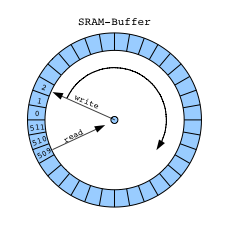
The NCO function contains a sine look-up tables (LUTs) that perform the following functions:
sin(n) = sin(2πn/N)
where:
n = Address input to the LUT
N = Number of samples in the LUT
sin(n) = Amplitude of sine wave at (2πn/N)
Incrementing n from 0 to N causes the LUT to output one complete cycle of amplitude values for the sine function. The value 2πn/N represents a fractional phase angle between 0 and 2π. The time (t) required to increment n from 0 to N is the period of the sine waveforms produced by the NCO function.
The LUT address is incremented once each system clock cycle by an amount equal to the phase input. The phase angle data is accumulated and stored in the phase accumulator register. The output of the phase accumulator register is used to address the LUTs.
The frequency (f) of the system clock (fCLK) is fixed. Therefore, the frequency of the sine waves is:
f = 1/t = fCLK × phase/2π.
As a taster of the code to come (Used the proverbial timer interrupt example code, and the old techniques on Direct digital synthesis available at places like interface.khm.de) .Ill leave you some pictures
Mine is the picture below (1st), below is the output of a grain synth , code available at rcarduino.blogspot.co.uk.
*The sinewave generator code i shall share is not the one at this link above, but an " original " one !.
Also had to mention the wicked BASIC program i been using to help me in my math algorithms called "Decimal BASIC", available at http://hp.vector.co.jp/authors/VA008683/english/.
The sine wave graphic at the top is from it !!


Friday, 3 August 2012
Assembler language endeavours in PIC land ...
I find the architecture of the PIC harder to grasp...
On studying Assembler language for Microchip PIC uC's managed to get confused with the real role of the STATUS Register ( RP0 and RP1 ). And why you have to resume it back to bank 0, after each of the changes...

Code is this :
On studying Assembler language for Microchip PIC uC's managed to get confused with the real role of the STATUS Register ( RP0 and RP1 ). And why you have to resume it back to bank 0, after each of the changes...

Code is this :
#include <p16F887.inc>
 __CONFIG    _CONFIG1, _LVP_OFF & _FCMEN_OFF & _IESO_OFF & _BOR_OFF & _CPD_OFF & _CP_OFF & _MCLRE_OFF & _PWRTE_ON & _WDT_OFF & _INTRC_OSC_NOCLKOUT
 __CONFIG    _CONFIG2, _WRT_OFF & _BOR21V

     org 0
Start:
     bsf     STATUS,RP0  ; select Register Bank 1
     bcf     TRISD,0     ; make IO Pin RD0 an output
     bcf     STATUS,RP0  ; back to Register Bank 0
     bsf     PORTD,0     ; turn on LED RD0 (DS0)
     bcf  PORTD,0
     bcf     STATUS,RP0
  bsf     STATUS,RP0  ; select Register Bank 1
     bcf     TRISD,1     ; make IO Pin RD1 an output
     bcf     STATUS,RP0  ; back to Register Bank 0
     bsf     PORTD,1     ; turn on LED RD1
     bcf  PORTD,1
     bcf     STATUS,RP0
  bsf     STATUS,RP0  ; select Register Bank 1
     bcf     TRISD,2    ; make IO Pin RD2 an output
     bcf     STATUS,RP0  ; back to Register Bank 0
     bsf     PORTD,2     ; turn on LED RD2
     bcf  PORTD,2
     bcf     STATUS,RP0
         bsf     STATUS,RP0  ; select Register Bank 1
     bcf     TRISD,3    ; make IO Pin RD3 an output
     bcf     STATUS,RP0  ; back to Register Bank 0
     bsf     PORTD,3     ; turn on LED RD3
     bcf  PORTD,3
     bcf     STATUS,RP0
         bsf     STATUS,RP0  ; select Register Bank 1
     bcf     TRISD,4    ; make IO Pin RD4 an output
     bcf     STATUS,RP0  ; back to Register Bank 0
     bsf     PORTD,4     ; turn on LED RD4
     bcf  PORTD,4
     bcf     STATUS,RP0
goto Start ; wait here
end
So it seems that this is the way banks work: In the status SFR, bit 5 , bit 6 and bit 7 are RP0, RP1 and IRP ( which It is used for indirect addressing), So The two banks used are RP0 and RP1. And they have.the RAM divided in 4 each of RP0 and RP1, which are blocks and we need to change it in order to use them ( im told this is one of the points in favour of the ATMEL chips). If we after using arrays then we'd have to use FSR-INDF ( not relevant now).
I was then also told, that MPLAB has some macros that sort it for you.
Its name is banksel .
So, after some research here is my way of seeing it...
The banksel will sort out for us the stuff related to the status for us, seting the bits and clearing them for us.
#include <p16F887.inc>
 __CONFIG    _CONFIG1, _LVP_OFF & _FCMEN_OFF & _IESO_OFF & _BOR_OFF & _CPD_OFF & _CP_OFF & _MCLRE_OFF & _PWRTE_ON & _WDT_OFF & _INTRC_OSC_NOCLKOUT
 __CONFIG    _CONFIG2, _WRT_OFF & _BOR21V

     org 0
Start:


  banksel TRISD           ;Include standard header file
                          ;for the selected device...

  clrf    TRISD           ;Clear TRISD. Sets PORTD to outputs.
  banksel PORTD           ;banksel used to return to bank 0,
                          ;where PORTD is located.

  movlw   0x55            ;Set PORTD value.

  movwf   PORTD
  clrf    PORTD
  goto    Start
  end                     ;All programs must have an end.
Also, managed to get the PCLATCH register understood, today ( Ill just say that is the counter of the program, and will cover the number of up to 8192, divided by the 13 bits of the SFR's PCL and PCLATCH (2^13=8192) , always incrementing automatically, though having the Least significant bits( LSB) on the PCL... there seem to be some quirks here for some cases, but im told to leave that for now !!
For completions of info:
PIC16F887 44 Pins, 8 leds on PORTD and PickIt2 debugger !
PS- Another code, brought from someone @ http://lusorobotica.com, explaining that you can set all your bits first, and then bring back the register back to bank 0.

#include <p16F887.inc>
 __CONFIG    _CONFIG1, _LVP_OFF & _FCMEN_OFF & _IESO_OFF & _BOR_OFF & _CPD_OFF & _CP_OFF & _MCLRE_OFF & _PWRTE_ON & _WDT_OFF & _INTRC_OSC_NOCLKOUT
 __CONFIG    _CONFIG2, _WRT_OFF & _BOR21V

org 0x00

Start:

     bsf     STATUS,RP0  ; choose Register 1
     MOVLW 0x00          ;load register W with 0
     MOVWF TRISD         ;Start register TRISD with 0 (Moved from the already loaded value in W)
     bcf     STATUS,RP0  ; Bit clear, back to Bank 0
     MOVLW b'10101010'   ; A pattern to light the LEDs (bynary, with 1 for on and 0 for off)
     MOVWF PORTD        ;write to port D
     GOTO $              ;

     end                ;The End !
Some people who been totally to blame for these adventures in PICland... and one is definitely SENA, who you can visit here http://www.antoniosergiosena.com/ .
He has a wicked tutorial in Portuguese which been priceless to me ! With examples in both C and ASSEMBLER; I chose Assembler first ( i know, i know...)
Man is a PRO in PIC assembler and C. Hands down !!
Also, as mentioned above, http://lusorobotica.com.

Some reference
http://www.mikroe.com/eng/chapters/view/3/chapter-2-core-sfrs/
Subscribe to:
Comments (Atom)